
Debugging "Certificate Chain Incomplete" Errors in Production
Learn how to isolate, diagnose, and fix missing intermediate certificates causing intermittent TLS handshake failures.

One of the most insidious networking failures occurs when a website loads perfectly fine on your laptop, but API clients, mobile apps, or backend webhooks fail with an untrusted certificate error. This is the hallmark of an incomplete certificate chain.
Everything looks healthy until traffic disappears from specific client types. Let's break down exactly why this happens and how to prove it.
The Path of Trust
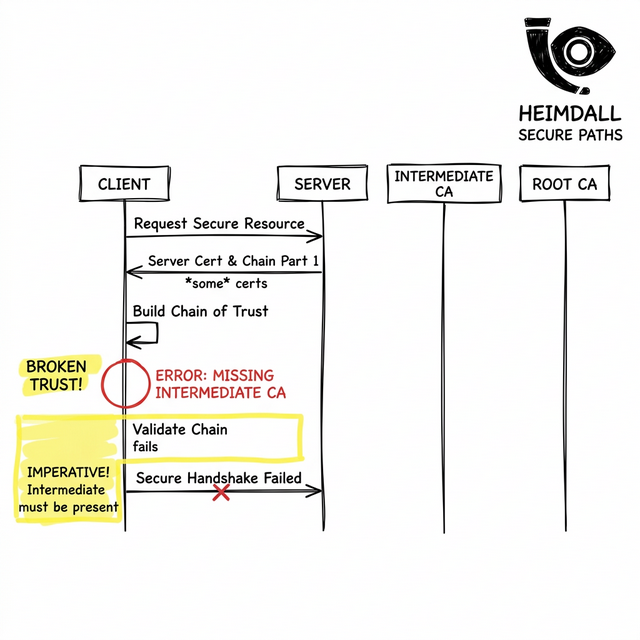
When you purchase a TLS certificate, it is rarely signed directly by a Root Certificate Authority (CA) that exists in a device's trust store. Instead, it is signed by an Intermediate CA to protect the root keys.
Because the client doesn't know about this Intermediate CA, the TLS specification requires your server to append the intermediate certificates during the handshake. If you just configure your server with the leaf certificate, the client cannot build a path to the trusted Root.
Why Browsers Hide The Problem
If the chain is broken, why does Chrome still show a green padlock? Modern web browsers cache intermediate certificates from previous sites you've visited, and they utilize 'AIA Fetching' to download missing chained certs on the fly.
However, programmatic clients (like an axois script, curl, or a Java backend) do not have this luxury. They evaluate exactly what the server sends. If the intermediate is missing, the handshake fails immediately with 'unable to get local issuer certificate'.
Interactive Debugging with OpenSSL
To prove a chain is unbroken, we must interrogate the server without browser caching getting in the way. Use openssl to inspect the chain sequence:
openssl s_client -showcerts -connect yourapi.com:443
Look at the 'Certificate chain' block in the output. If you only see one certificate (depth=0), your server is misconfigured. A healthy chain should look like this:
Certificate chain
 0 s:/CN=yourapi.com i:/C=US/O=Let's Encrypt/CN=R3
 1 s:/C=US/O=Let's Encrypt/CN=R3 i:/C=US/O=Internet Security Research Group/CN=ISRG Root X1
Monitoring Strategy
This is where most monitoring setups have blind spots. Internal systems don't often simulate raw programmatic clients against external endpoints.
To prevent this, you need explicit synthetic monitoring that enforces strict SSL verification. By utilizing a platform like Heimdall Observer, you can continuously assess the full chain payload of your infrastructure across global networks. Heimdall specifically alerts on broken chains and untrusted issuers, giving you the visibility needed to fix misconfigured load balancers before the API clients start failing.
Infrastructure engineer focused on DNS, networking, and the invisible layers that determine whether applications are reachable.
"We built Heimdall Observer to monitor the kinds of issues discussed in this article."