
How to Fix DNS SERVFAIL Errors
SERVFAIL means the resolution chain is broken. Learn how to fix DNSSEC validation failures and lame delegations to restore traffic immediately.

A SERVFAIL is a hard stop. It means the recursive resolver protecting your users determined your authoritative zone is fundamentally broken or cryptographically untrustworthy. When this happens, traffic drops to zero instantly.
If you are currently experiencing a SERVFAIL incident, use the following triage runbook.
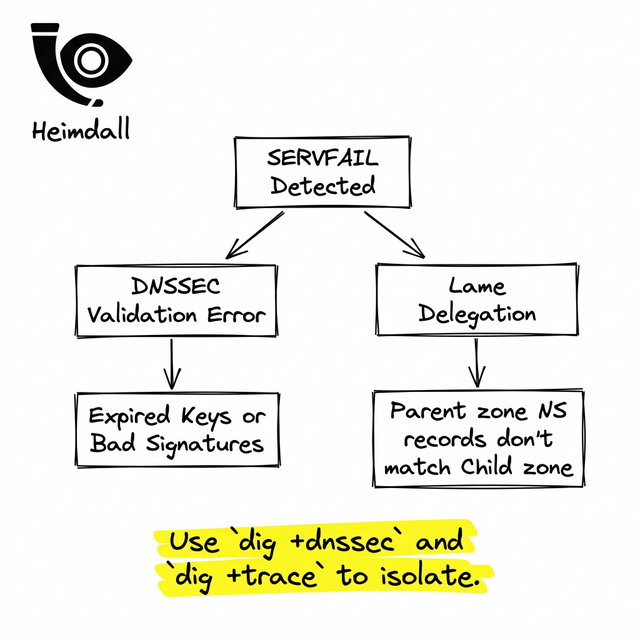
Emergency Triage Runbook
Phase 1: Verify the Cryptography
The vast majority of SERVFAILs are self-inflicted wounds caused by expired DNSSEC keys. To check if your domain's cryptography is actively rejecting users, force a diagnostic query that explicitly queries the signatures:
delv @8.8.8.8 yourdomain.com
Look for lines reporting 'resolution failed'. To confirm DNSSEC is the culprit, run the query with Checking Disabled:
dig +cd yourdomain.com A
If the `+cd` query returns a valid IP address but normal queries return SERVFAIL, your DNSSEC configuration is broken. The immediate mitigation is to log into your Domain Registrar (e.g., Namecheap, GoDaddy) and remove all DS records. Do not touch your nameserver configuration yet. Removing the DS records unlinks the trust chain and will restore traffic as soon as the registrar TLDs propagate.
Phase 2: Verify Delegation Glue
If DNSSEC is not enabled, the second most likely cause is a lame delegation. This occurs when your registrar is pointing to nameservers that refuse to answer for your domain.
Verify the exact NS records listed at the TLD level:
dig +trace yourdomain.com
Look at the final hop before the failure. Note the nameserver hostnames. Now, query one of those specific nameservers:
dig @ns1.the-server-from-trace.com yourdomain.com A
If the server returns 'REFUSED', you have a mapping mismatch. Your registrar is pointing to a zone file that has been deleted or suspended.
Preventing Future Fire Drills
Manual triage of a SERVFAIL is stressful because every minute counts against your SLA.
By deploying proactive lifecycle synthetics with Heimdall Observer, you automate these cryptographic checks. The platform alerts you directly in Slack when a DS record drifts or a key approaches expiration, allowing you to fix the configuration weeks before it triggers a user-facing SERVFAIL.
Ingénieur d'infrastructure axé sur le DNS, les réseaux et les couches invisibles qui déterminent si les applications sont accessibles.
"Nous avons conçu Heimdall Observer pour surveiller les types de problèmes abordés dans cet article."