
How to Debug DNS Resolution Problems Like an SRE
Stop trusting your local cache. Learn the exact command-line workflows and tools SREs use to isolate cascading DNS failures globally.

When pager alerts trigger a sev-1 incident and customers report your service is unreachable, the instinct is to reboot pods or restart ingress controllers. But if your internal metrics are green, you are likely facing a routing or DNS disruption.
Effective SREs don't guess during an outage; they isolate the fault domain. Debugging a DNS issue requires stepping outside your infrastructure and mimicking the exact journey a packet takes from a user's device to your authoritative nameservers.
The Golden Rule: Never Trust the Local Cache
The most common mistake engineers make is testing with 'ping' or their local browser. These tools ask the operating system's stub resolver for directions. If the OS recently received a negative response (NXDOMAIN) or a stale IP address, it will confidently lie to you until its cache expires.
SRE Triage: The App-Layer Bypass
Before diving into raw DNS packets, a highly effective technique is to prove the backend is healthy by intentionally bypassing DNS at the application layer. You can use curl to force a connection to the known healthy IP, while passing the correct Host header:
curl -v --resolve yourdomain.com:443:192.0.2.1 https://yourdomain.com
If this request succeeds and returns a 200 OK, you have definitively proven that your compute, load balancers, and TLS certificates are completely healthy. The only broken component is name resolution.
Tracing the Resolution Chain
Once you know the backend is fine, you must track down exactly which DNS server is dropping the ball. This requires interrogating the internet's hierarchy.
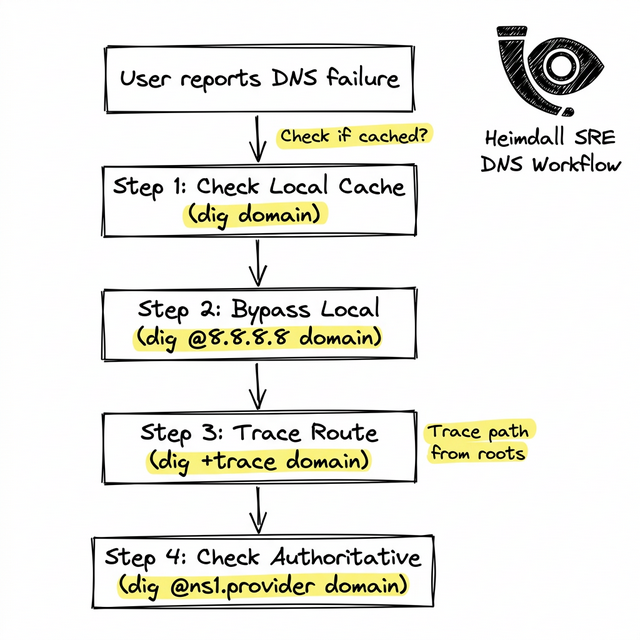
Step 1: Check Public Resolvers
Does the rest of the world see the outage, or just your office ISP? Ask a public resolver directly:
dig @1.1.1.1 yourdomain.com A
Step 2: Follow the Delegation Path
If Cloudflare or Google DNS can't resolve it, use the trace flag to force your local machine to act as a recursive resolver. It will start at the Root servers, move to the TLD, and finally query your authoritative servers:
dig +trace yourdomain.com
Watch the output carefully. If the trace succeeds all the way to the .com servers, but the final handoff to your provider (like AWS Route53) times out or returns REFUSED, your authoritative zone is broken.
Automating the Triage
Running these commands during a firefight wastes precious minutes. Mature engineering teams use global synthetic monitoring networks to execute exactly these checks continuously.
By deploying Heimdall Observer, you automate the tedious process of executing global sweeps, receiving instant alerts the second an authoritative server stops responding.
Engenheiro de infraestrutura focado em DNS, redes e nas camadas invisíveis que determinan se as aplicações são alcançáveis.
"Criamos o Heimdall Observer para solucionar os problemas discutidos neste artigo."