
Introduction: The Failure With No Error Message
Everything looks healthy until traffic disappears. On 2026-02-20, customers using Cloudflare's Bring Your Own IP (BYOIP) service learned what that means: their prefixes were withdrawn from the routing table, and for hours a share of connections to their addresses never arrived — BGP path hunting, seen from the client side. No 500, no reset, no log line at the edge. A 500 is a response you can count; this is an absence you have to infer.
A withdrawal is a control-plane event with a data-plane symptom: packets go toward a next hop that no longer has a route, and the network drops them. The client cannot separate that from a slow server, so it retransmits until its budget runs out, and the failure gets filed under latency.
What follows is the mechanism from UPDATE to expired connect: what an in-flight connection experiences, why path hunting is convergence rather than a routing bug, how to read it in mtr, and what to measure from outside your network.
Problem Overview: Routing and Resolution Are Separate Failure Planes
Reachability is the product of two independent planes. Resolution answers which address should receive the packet; routing decides whether a packet sent there can arrive. Different systems, different failure reasons, different symptoms. Conflating them is the first mistake in most path-hunting investigations.
A service can resolve perfectly and still be unreachable, and the same event can look different on each plane. The 1.1.1.1 website returned HTTP 403 with an 'Edge IP Restricted' message, while DNS resolution over the 1.1.1.1 Public Resolver, including DNS over HTTPS, was not affected. One incident, two protocols, two answers.
What a Withdrawal Does to an In-Flight TCP Connection
A withdrawal is an UPDATE that removes a prefix from the sender's Adj-RIB-Out. Peers drop it from their Loc-RIB and run best-path selection again. Nothing reaches the transport layer: no ICMP message means 'this route was withdrawn', and TCP cannot renegotiate a path. Damage starts with the next packet to reach an AS that has flushed the route: it is dropped, and any ICMP unreachable is usually filtered.
Why Receivers See Timeouts Instead of Resets
A RST has an author: a host with no listener, or a middlebox that rejects. A dropped packet has no author, so nobody sends a reset. The SYN goes out, the timer doubles, and the same SYN is sent again, possibly along a different path, because each packet is routed independently.
With Linux's default tcp_syn_retries of 6 and a one-second initial RTO, the kernel gives up after roughly 127 seconds with ETIMEDOUT; browsers and health checkers quit earlier. The result looks like slowness: connect time climbs, no status code is recorded, no error counter increments, because nothing that logs saw the request.
Technical Deep Dive: Path Hunting, Hop by Hop
Anycast works because the same prefix is announced from many locations. Each router picks one best path by local preference, AS path length, origin, MED and IGP cost. No router holds a global view, and convergence has no atomic commit: each AS applies policy, propagates to peers and, where configured, waits out its MRAI timer, so networks converge at different times to different answers.
The Walk That Consumes the Timeout Budget
When one anycast location's announcement disappears, neighbours lose that path and fall back to their next best entry. If the next best is another instance, traffic shifts and anycast does its job. If the withdrawal removed the only path a network had, the route is flushed and the withdrawal propagates outward, AS by AS, each one re-evaluating a table changing underneath it.
Traffic forwarded in that window follows a path that was valid a second ago and now ends at a router with no route. That is path hunting: not a loop, not a misconfiguration, just distributed convergence while packets are in flight. Each SYN retransmission is a new decision, so one attempt reaches an instance, the next dies one AS closer, and a third takes a longer fallback that appears as an RTT spike.
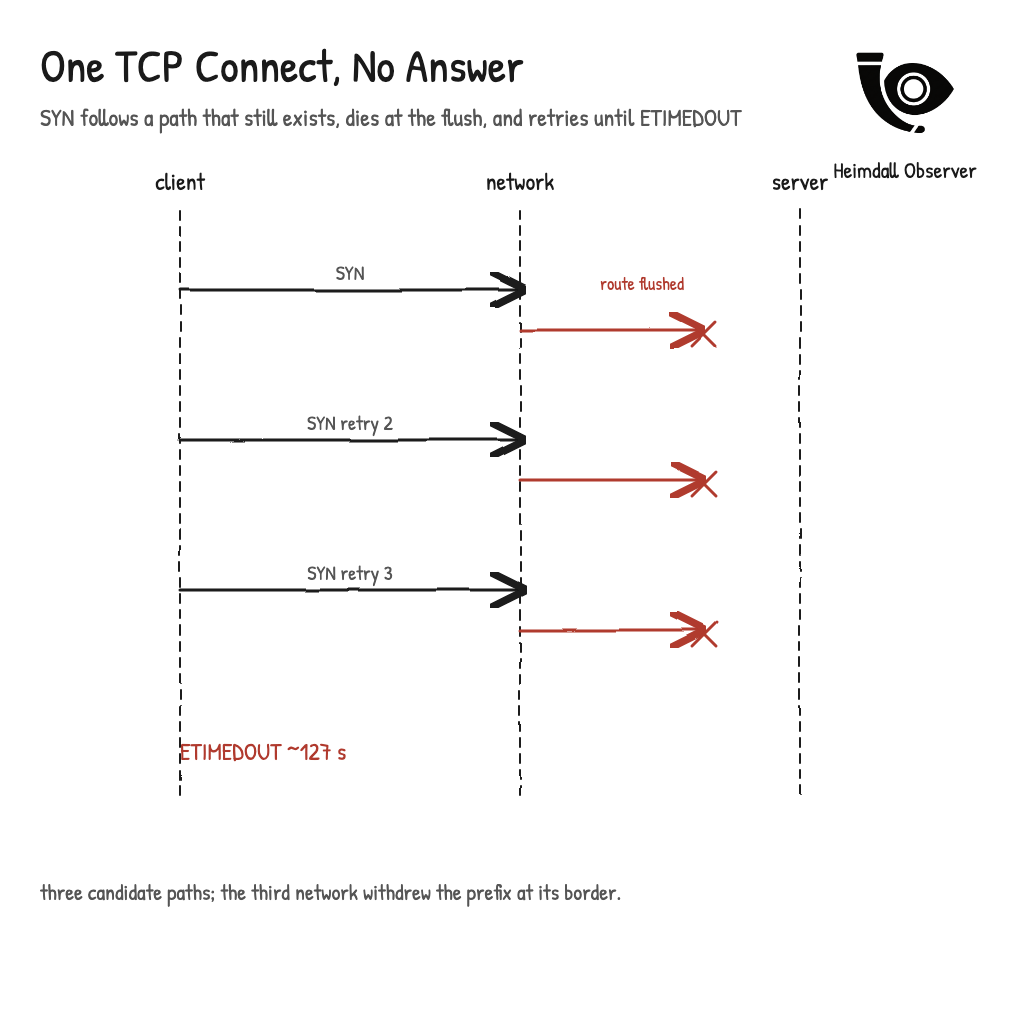
Figure 1: one TCP connect during path hunting. The SYN follows a path that still exists, dies where the route was flushed, and is retransmitted until ETIMEDOUT at roughly 127 seconds.
Case Study: The 2026-02-20 Cloudflare BYOIP Withdrawal
The trigger sat in the control plane. On 2026-02-20 at 17:48 UTC Cloudflare experienced a service outage for a subset of customers using BYOIP. The cause was a change to how the network manages IP addresses onboarded through BYOIP: a regularly running cleanup sub-task queried the API with pending_delete set to an empty string, so the API returned all BYOIP prefixes.
Between 17:56 and 18:46 UTC, about 1,100 of the 4,306 BYOIP prefixes were withdrawn, 25% of them. Total incident duration was 6 hours and 7 minutes. Affected customers first experienced BGP path hunting, where connections traverse networks looking for a route until they time out and fail.
That partial shape is also the blast radius: three quarters of the prefixes kept working, so any aggregate view stays active while users experience connect timeouts. A 25% withdrawal defeats every alert tuned for a total outage.
Recovery carried its own control-plane dependency: about 300 prefixes could not be remediated through the dashboard because of a software bug and were manually restored by engineers at 23:03 UTC. The change behind it was part of Cloudflare's Code Orange: Fail Small work toward safe, automated, health-mediated deployment.
Failure Modes: Reading Path Hunting in mtr
Once the mechanism is clear, the question narrows: which silent stall is this? mtr shows where the path stops, TCP behaviour whether anything answered, and a synthetic check what a client experienced.
| Failure type | mtr view | TCP behaviour | Synthetic check |
|---|---|---|---|
| Prefix withdrawal | loss from a hop onward | SYN retries, ETIMEDOUT | timeout, no status |
| Route leak | unexpected transit AS | connects, higher RTT | regional split |
| Hijack | wrong origin AS | wrong host or TLS | wrong certificate |
| Blackhole (RTBH) | clean path, then 100% | SYN dropped, timeout | timeout, same as above |
| MTU blackhole | clean at small size | stalls on big packet | small ok, large hangs |
Two rows get misclassified under pressure. A blackhole and a prefix withdrawal are indistinguishable from the client side: both are a path that stops answering, with no reset and no status code. Only a routing-table view, from a looking glass or a BGP feed, separates them. The MTU row is the second trap: with the ICMP 'fragmentation needed' message filtered, the handshake completes and the connection stalls on the first large response. Probe with ping -M do -s 1472 (Linux) or -D (macOS).
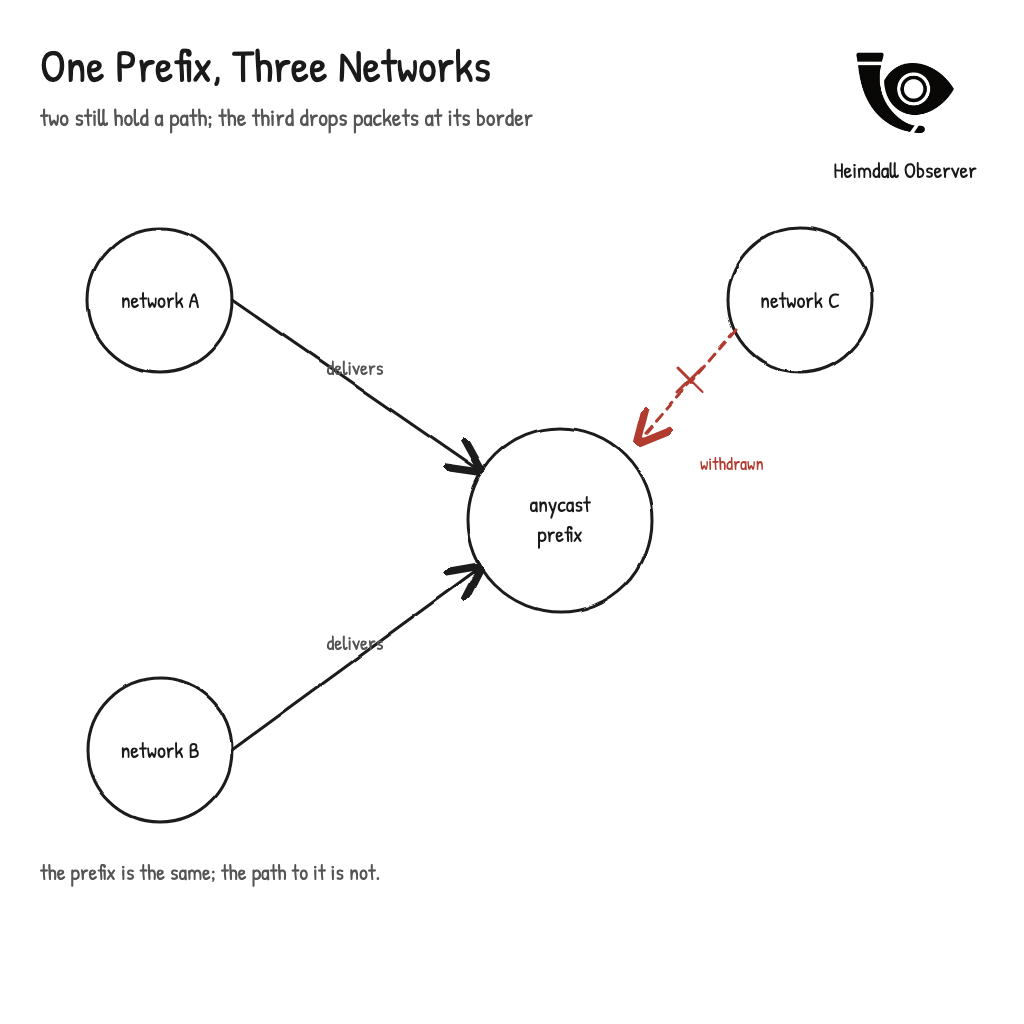
Figure 2: the same anycast prefix seen from three networks. Two still hold a path and deliver traffic; the third had only the withdrawn path and now drops packets at its border.
Debugging Workflow: Proving DNS Is Fine While the Path Is Not
Order matters: prove resolution, then prove the path, then find where it dies. Run each step from a network you do not own, or you are describing your own routing policy.
Step 1: Resolve from more than one resolver.
dig +short www.example.com
dig +short www.example.com @1.1.1.1
dig +short www.example.com @8.8.8.8
If all three agree, resolution is not your problem. If they differ, you are looking at a CDN or resolver-level split, and the address you got may not be the one users reach.
Step 2: Remove DNS from the request.
curl --resolve 'www.example.com:443:203.0.113.10' -v --connect-timeout 10 https://www.example.com
Read the output in three buckets. '* Trying 203.0.113.10:443...' followed by silence until the timeout means the SYN got no answer: path, blackhole, or filtered port. 'Connection refused' means a host answered with RST: the path is fine and nothing is listening. A connect followed by a TLS error means trust, SNI or protocol. Because --resolve removes the resolver, this proves 'DNS is fine and the path is not'.
Step 3: Find where the path dies.
mtr -rwzc 100 -T -P 443 203.0.113.10
Flags: -r report, -w wide, -z AS numbers, -c 100 cycles, -T -P 443 to probe TCP instead of ICMP. The AS column answers the routing question. Loss that starts at a hop and continues to the last hop is real; loss at one hop that vanishes at the next is usually ICMP rate limiting. Run it twice: a changing path is convergence in progress.
Step 4: Confirm with a TCP traceroute.
traceroute -T -p 443 -n 203.0.113.10
ICMP traceroute is filtered on many networks, which is why a trace can appear to stop at hop four while the path is healthy. TCP mode speaks the protocol your users speak.
Step 5: Check who is supposed to originate the prefix.
whois 203.0.113.0
whois -h whois.radb.net 203.0.113.0
The RIR response gives the allocation; the IRR route object gives the origin AS that should announce it. Compare with the last AS in mtr. When they disagree, stop debugging a withdrawal: you are looking at a hijack or a leak.
Step 6: Repeat from a second network.
A phone hotspot or a VM in an unrelated AS is enough. A failure that reproduces from two unrelated networks is a prefix-level event; from one, it is usually that network's problem, including when that network is yours.
Monitoring Strategy: Per-Vantage-Point Reachability
Four signals cover this failure mode. The thresholds are starting heuristics, not universal constants.
- Reachability from N distinct networks. Probe from at least three vantage points whose origin ASes differ, and page when two or more fail twice consecutively at a 60-second interval. One vantage failing is usually local routing; two agreeing is a prefix-level event. Two consecutive failures filters single-packet loss.
- RTT variance across vantage points. Alert when p95 RTT from any vantage exceeds twice its seven-day baseline for five minutes, or when the spread between fastest and slowest exceeds three times the median. Path hunting shows as RTT growth before it shows as timeouts, which makes this the early warning.
- TCP connect time versus TLS handshake time. Record them as separate histograms. Connect p95 above three times baseline points at the path; handshake p95 above that with a normal connect points at certificates, SNI, or the origin. One response-time number discards the distinction.
- Failure count and timeout count as separate series. Count timeouts, refusals, TLS failures and HTTP 5xx independently, then page on a timeout ratio above 20% of attempts for three minutes. Timeout-dominated failures point at routing, refusals at the host, 5xx at your application. Timeouts are the only signal that survives when nothing answers.
Why Your Prefix Dashboard Cannot Answer the Question
Every number your routers produce describes your side of the exchange. The RIB count tells you what your routers know; a dashboard built on your own sessions tells you what you announced, not what other networks accepted. There is no global routing table: BGP is independent decisions on partial information, and a withdrawal is an absence in somebody else's table.
So 'is this prefix reachable from AS X right now' needs an observer inside AS X, or a diverse set you trust to approximate it. Looking glasses help, but they are per-router, often rate-limited, and stale. This is where most monitoring setups have blind spots, a gap the inside-out playbook documents.
Best Practices: Incident Checklist and Coverage Rules
The first fifteen minutes, in order:
- Scope it: confirm resolution from two resolvers, then whether one address or all of them fail, and whether the failure is regional or global.
- Reproduce from a network you do not own; it separates 'our edge is broken' from 'the path to our edge is broken'.
- Capture evidence in UTC: dig output, curl -v with --connect-timeout, mtr -rwzc 100 from each vantage, and the whois origin.
- Classify the plane: resolution, path, transport or TLS, application. Do not escalate before you can name one.
- Escalate with specifics: source address and AS, destination prefix, failure timestamps, both traces, expected origin AS. Ask the one question that matters: do you see a path to this prefix right now? 'The site is slow' gets queued; two mtrs get investigated.
- Freeze your own changes. With the path broken you cannot distinguish a fix from convergence, and you will credit the recovery to whatever you changed last. For the same reason, an external check buys ground truth during the window: it tells you the path is back before your users do, and gives the provider evidence independent of its own view.
Coverage rules that survive the next incident:
- Split 'can resolve' and 'can serve' into two assertions, so neither failure hides behind the other.
- Use at least three vantage networks, and for anycast at least one in each region you serve.
- Treat timeouts as a first-class metric with their own threshold, and record the observed AS path with every check.
Frequently Asked Questions
Why does a withdrawn route cause timeouts instead of resets?
A reset has to be sent by something. Dropped packets are discarded by routers that were never part of the connection, so no RST is generated; the client retransmits with a doubling timer until ETIMEDOUT at roughly 127 seconds. Resets mean the packet reached a host; timeouts mean it did not.
Is BGP path hunting the same as a routing loop?
No. A loop is a persistent forwarding cycle. Path hunting is transient: routers fall back through candidate paths as withdrawals propagate, and the walk ends when the tables converge. One is a defect; the other is the cost of convergence.
How many vantage points do I need to detect an anycast prefix withdrawal?
Three distinct origin ASes is a workable floor, because two agreeing failures justify a page. More is better precisely because withdrawals are partial: in the 2026-02-20 event, 25% of prefixes were withdrawn while the rest kept working, exactly what one probe is most likely to miss.
My DNS resolves and the site still will not load. What do I run first?
dig +short against two public resolvers, then curl --resolve with that exact address and --connect-timeout 10. If the connect times out while resolution is consistent, the path is the problem and mtr from a second network is next. If the connect succeeds and TLS fails, you are debugging trust.
Conclusion
A withdrawn route leaves no artifact on your side: no status code, no log line, no error counter. It exists only as an absence between someone else's network and your address, so the only honest signal is a check running out there.
Synthetic checks that live outside your own network, such as Heimdall's HTTP, TCP and DNS monitors, turn that absence into a data point you can page on.